
scrubjay
The app/logic for syncing Claude Code across machines. Your personal content is kept in separate repos so this one can be shared/public without leaking anything:
| Repo | Role | Visibility |
|---|---|---|
| scrubjay (this) | scripts, hooks, docs — the logic | public-able |
| scrubjay-data | hosts/, settings/, claude-md/, templates/, memory/, logs/ |
private |
| scrubjay-chats | full chat transcripts (.jsonl), relayed off each machine |
private |
Public and readable, but source-available rather than open source: use it for anything, including inside your company, just don't resell it as a competing product. See Licensing.
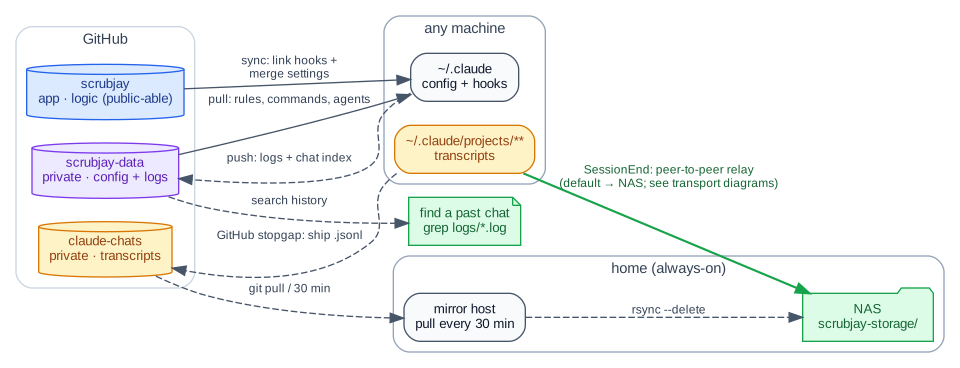
Diagram source: overview.dot — dot -Tsvg docs/overview.dot -o docs/overview.svg.
Flow:
scrubjay(logic) +scrubjay-data(your config) → applied into each machine's~/.claudebyclaude-sync.sh. OnSessionEnda hook appends a one-line entry toscrubjay-data/logs/<host>.logand relays the session (transcript, subagents, plans) off the machine via a pluggable backend — either peer-to-peer to your own NAS (over WireGuard), or to a privatescrubjay-chatsrepo on GitHub if you'd rather not run storage of your own. Top-level is keyed by machine so envs stay distinct and Claude can re-tailor one host's rules for another.
Where to go
- Project brief — what problem it solves, how it differs from a shared git repo or a shared NAS, and what it does not do yet. Read this first if you are deciding whether scrubjay is for you.
- Concepts — the two-kinds-of-sync model, what scrubjay is, and what lives in the database. Start here to understand why the system is shaped this way.
- Onboarding — install on a new machine (interactive script or Claude-assisted), the repo layout, and the machine-local pointers.
- Day-to-day — the hooks that keep it hands-off, finding a past chat, and troubleshooting.
- Query the archive (MCP) — recall a past session by topic from
inside a live Claude session via the read-only
sjmcpserver. - Slash commands — the
/sj*command reference. - Transcripts: relay + NAS — how sessions ride peer-to-peer to your own NAS, and the two P2P paths (WireGuard / SSH).
- Reference — the by-hand command cheatsheet and environment toggles.